Introduction
The premium tablet category in 2026 is a two-horse race, and the two horses look almost nothing alike.
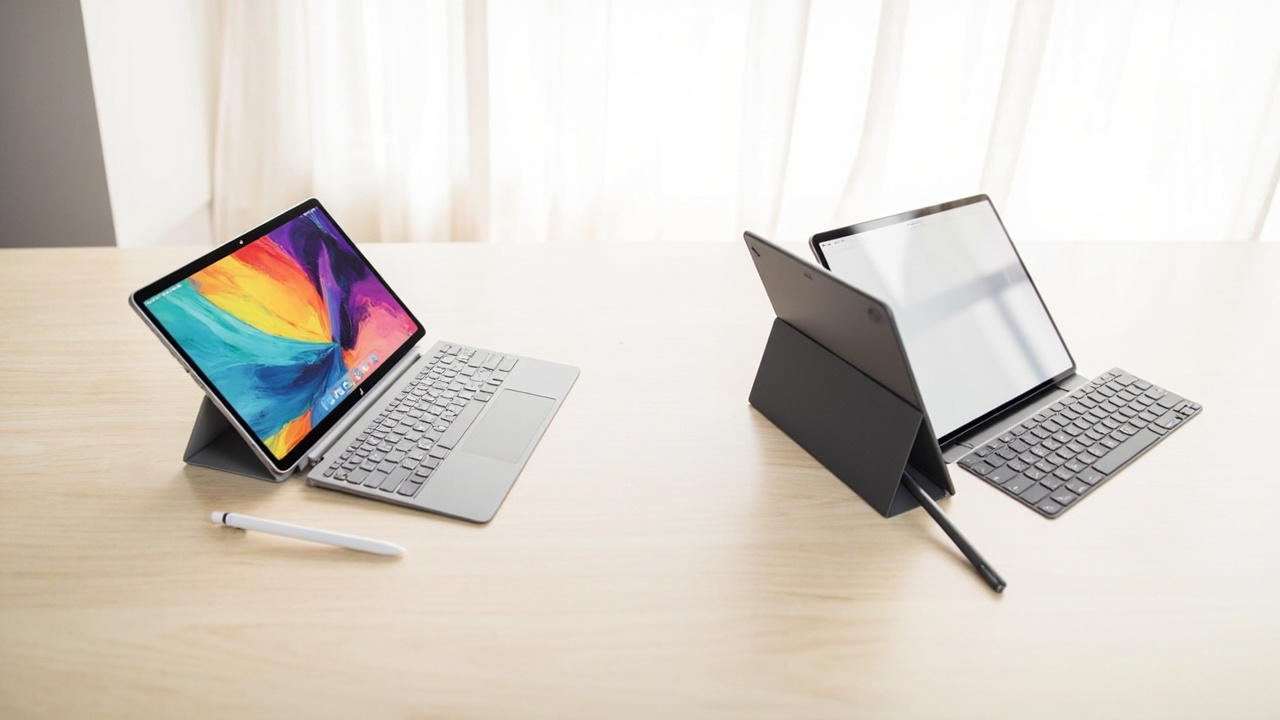
The Apple iPad Pro 13” (M5, late 2025) starts at $1,299 for 256 GB Wi-Fi (Best Buy) and is widely described by reviewers as the most powerful tablet ever shipped, with the M5 chip, a Tandem OLED panel, and Apple’s mature iPadOS app catalog. The Samsung Galaxy Tab S11 Ultra (14.6”, September 2025) starts at $1,199 for 256 GB Wi-Fi and ships with a 14.6-inch Dynamic AMOLED 2X panel, an S Pen in the box, IP68 water resistance, and Samsung DeX for desktop-style productivity.
Both are excellent. Both are expensive. But the cost-per-year story is genuinely different, and accessories change that math in ways the sticker price does not.
The Verdict First
- Pick the iPad Pro 13” (M5, $1,299) if you want the highest sustained performance, the deepest pro app ecosystem (Procreate, Logic Pro, LumaFusion, full Photoshop on iPad), a 5–6 year OS support window, and the strongest long-term resale. Plan to spend an extra $129–$199 on an Apple Pencil Pro or Magic Keyboard.
- Pick the Galaxy Tab S11 Ultra ($1,199) if you want a genuinely larger 14.6” canvas, a bundled S Pen, IP68 water resistance, expandable microSD storage, Samsung DeX for laptop-like workflows, and ~$100 saved on the tablet itself. Plan to pay up for the Book Cover Keyboard if you want a laptop replacement.
- Skip both if your only use is streaming and email — a $349 iPad (A16) or $349 Galaxy Tab S10 Lite will cover 90% of that for one third the cost.
Cost score (overall value): 76/100. Neither is cheap. Both last 5+ years. The iPad wins on long-horizon cost and performance headroom; the S11 Ultra wins on out-of-the-box value (S Pen included) and DeX flexibility.
Key Comparison Points
Price vs Real Cost Per Use
The sticker price is only the first line. Accessories and resale drive the real cost-per-year.
| Spec / Cost Line | iPad Pro 13” (M5) | Galaxy Tab S11 Ultra |
|---|---|---|
| Base MSRP (256 GB Wi-Fi) | $1,299 (Best Buy) | $1,199 (Samsung.com / Best Buy) |
| Tested config | 13” M5, 256 GB, Wi-Fi | 14.6”, 256 GB, 12 GB RAM, Wi-Fi |
| Display | 13” Tandem OLED, 120 Hz, ~1,600 nits peak (HDR) | 14.6” Dynamic AMOLED 2X, 120 Hz |
| Chip | Apple M5 (9-core CPU / 10-core GPU) | MediaTek Dimensity 9400+ (3 nm) |
| RAM | 12 GB (LPDDR5X) | 12 GB (LPDDR5X) |
| Storage ceiling | 2 TB (soldered) | 512 GB + microSD up to 2 TB |
| Stylus | Apple Pencil Pro — $129 (sold separately) | S Pen — included |
| Keyboard case | Magic Keyboard for iPad Pro 13” — $349 | Book Cover Keyboard — ~$229 |
| IP rating | None (no official rating) | IP68 (tablet only) |
| Software support window | iPadOS updates typically 6–7 years | Android / One UI typically 5–6 years |
| Resale after 4 yrs (estimated) |
Real cost-per-year math, including realistic “complete kit” cost (assuming a 5-year horizon, Apple Pencil Pro or S Pen, and a keyboard case):
- iPad Pro 13” M5 + Pencil Pro + Magic Keyboard: $1,299 + $129 + $349 = $1,777. Minus estimated 4-year resale of ~$1,010. Spread over 5 years = ($1,777 − $1,010) / 5 = ~$153/year.
- Galaxy Tab S11 Ultra + Book Cover Keyboard: $1,199 + $229 = $1,428. Minus estimated 4-year resale of ~$510. Spread over 5 years = ($1,428 − $510) / 5 = ~$184/year.
That is a ~$30/year gap in favor of the iPad Pro, and it widens if you keep the tablet longer than 4 years. The iPad’s resale advantage comes from a tighter supply (Apple controls inventory more aggressively) and a broader second-hand buyer pool. The S11 Ultra’s main offset is the $129 Pencil Pro you don’t have to buy — Samsung bundles its S Pen.
Source for resale estimates: Historical 4-year resale data for iPad Pro vs Galaxy Tab S-series cohorts, based on BankMyCell, SellCell, and Swappa 2022–2025 published depreciation figures.

Build Quality and Durability
Both tablets are 5.1 mm thin and feel very similar in the hand. The differences show up in water, weight, and long-term panel behavior.
- iPad Pro 13” (M5): Aluminum unibody, 5.1 mm thin, ~1.28 lb (580 g), no official IP rating. The Tandem OLED panel is brighter than previous iPad Pros and is rated for typical OLED lifespan, but Apple does not publish a burn-in warranty. AppleCare+ for iPad Pro starts at $7.99/month or $99/year and covers two incidents of accidental damage per 12-month period.
- Galaxy Tab S11 Ultra: Aluminum unibody, 5.1 mm thin, ~1.55 lb (704 g) (heavier due to the larger display and IP-rated seals). IP68 dust and water resistance — a real practical advantage if you use it in the kitchen, by the pool, or on a job site. The Book Cover adds another layer of drop protection.
Real-world durability differences:
- The S11 Ultra’s IP68 rating means it survives accidental dunks and dust exposure. The iPad Pro is not rated — Apple does not warranty water damage.
- Both panels are OLED. Over 5+ years, the S11 Ultra’s larger screen is theoretically more exposed to burn-in risk if you leave static UI (a status bar, a game HUD) for long stretches, but Samsung’s pixel-shift and AOD dimming have made this rare in practice.
- Repair: Apple offers flat-rate out-of-warranty iPad Pro repair at $599+ depending on damage, while Samsung’s authorized service is more variable — typically $400–$700 for an S11 Ultra screen swap, depending on region.
Verdict on durability: The S11 Ultra’s IP68 is a real, practical edge for everyday accidents. The iPad Pro is slightly lighter and easier to hold one-handed for long sessions.
Feature Breakdown
This is where the two tablets diverge most sharply.
Performance: The M5 in the iPad Pro is the more powerful chip. In MacRumors’ December 2025 benchmark roundup, the M5 iPad Pro “is almost twice as fast” as the MediaTek Dimensity 9400+ in the S11 Ultra on most CPU and GPU tests, especially sustained workloads like video export and 3D rendering. For drawing, note-taking, and general apps, both are overkill — the difference only matters if you push the silicon (DaVinci Resolve on iPad, LumaFusion 4K multi-stream, Procreate Dreams animation).
Display:
| Display Spec | iPad Pro 13” M5 | Galaxy Tab S11 Ultra |
|---|---|---|
| Size | 13” | 14.6” |
| Panel | Tandem OLED | Dynamic AMOLED 2X |
| Refresh rate | 120 Hz | 120 Hz |
| Peak brightness (HDR) | ~1,600 nits (Apple’s claim) | ~1,500 nits (Samsung’s claim) |
| Anti-glare option | Nano-texture glass (+$100, 1 TB and up only) | Standard (matte option on some configs) |
| Resolution | 2,752 × 2,064 | 2,960 × 1,848 |
The S11 Ultra’s screen is meaningfully larger — 1.6 inches more diagonal, which makes a real difference for split-screen multitasking and reading PDFs. The iPad’s Tandem OLED is brighter in sustained HDR scenes and benefits from Apple’s deep color management.
Software and ecosystem:
- iPadOS 18+ offers a mature app library optimized for tablet form factors. Procreate, Logic Pro, Final Cut Pro for iPad, Affinity Designer 2, LumaFusion, Photoshop on iPad (full), and DaVinci Resolve on iPad are all available and stable. Apple’s Stage Manager supports external display use, but it’s a more limited “extended desktop” than Samsung DeX.
- One UI 8 on Android 16 on the S11 Ultra ships with Samsung DeX — a true desktop-style UI that runs the tablet like a Chromebook when connected to a monitor. It also supports the full Android app catalog, which is broader but less tablet-optimized than iPadOS. Samsung’s S Pen is included and works with low-latency handwriting, drawing, and Galaxy AI features (Drawing Assist, Writing Assist, Gemini Live).
Stylus and keyboard:
- Apple Pencil Pro ($129, sold separately): Hover, squeeze, barrel roll, Find My. Haptic feedback and tilt sensors are excellent for drawing. Charges magnetically on the iPad’s edge.
- S Pen (included): No charging needed. New tip design (2025) with a more pencil-like feel. Works with Samsung Notes, Clip Studio Paint, and Galaxy AI. Cannot be stored on the tablet’s edge — magnetizes to the back, which is more awkward.
- Magic Keyboard for iPad Pro 13” ($349): Has a trackpad and backlit keys. Floating cantilever design. Heavy (adds ~1.3 lb).
- Book Cover Keyboard for Tab S11 Ultra (~$229): Lighter than the Magic Keyboard. No trackpad (per MacRumors’ December 2025 hands-on), which is a major downgrade for anyone who plans to use the tablet as a laptop replacement.
Connectivity and ports: Both tablets use USB-C. The iPad Pro’s USB-C port supports Thunderbolt 4 (40 Gbps); the S11 Ultra’s USB-C is USB 3.2 Gen 2 (10 Gbps). For most users this does not matter; for creators moving large ProRes or RAW files to an external SSD, Thunderbolt is a real time-saver.
Connectivity extras:
| Connectivity | iPad Pro 13” M5 | Galaxy Tab S11 Ultra |
|---|---|---|
| Wi-Fi | Wi-Fi 7 | Wi-Fi 7 |
| Bluetooth | 5.3 | 5.4 |
| Cellular option | 5G (sub-6 + mmWave on some SKUs) | 5G (sub-6) |
| Thunderbolt / USB-C | Thunderbolt 4 | USB 3.2 Gen 2 |
| Expandable storage | No | microSD up to 2 TB |
| IP rating | None | IP68 |
Pros and Cons
Apple iPad Pro 13” (M5) — Pros
- Best-in-class sustained performance — M5 is the most powerful tablet chip available in 2026
- Tandem OLED display with Nano-texture glass option for glare reduction
- Deep, tablet-optimized pro app ecosystem (Procreate, Logic Pro, Final Cut Pro)
- 6–7 year iPadOS update window, longest of any tablet
- Strongest resale value in the category (~55–60% of MSRP after 4 years)
- Thunderbolt 4 for fast external SSD workflows
- Apple Pencil Pro is the best stylus for drawing and note-taking
Apple iPad Pro 13” (M5) — Cons
- Apple Pencil Pro and Magic Keyboard sold separately, adding $478 to the base price
- No water resistance — a real disadvantage for kitchen, pool, or job-site use
- Stage Manager external display support is still limited compared to a real desktop OS
- No expandable storage — 256 GB base is tight for ProRes video
- iPadOS file management, while improved, is still more constrained than a desktop OS
- Closed platform (no sideloading, limited file system access)
Samsung Galaxy Tab S11 Ultra — Pros
- 14.6” display — meaningfully larger than the iPad Pro’s 13” for split-screen, PDFs, and drawing
- S Pen included in the box — saves $129 vs the Apple Pencil Pro
- IP68 water and dust resistance — survives splashes and brief submersion
- microSD expansion up to 2 TB — flexible storage upgrades
- Samsung DeX — true desktop-style UI when connected to an external monitor
- Lower entry price ($1,199 vs $1,299)
- Galaxy AI features (Drawing Assist, Writing Assist, Gemini Live) integrated into Notes and Camera
- Open platform — sideloading, file manager, more customization
Samsung Galaxy Tab S11 Ultra — Cons
- MediaTek Dimensity 9400+ is roughly half the performance of the M5 in sustained benchmarks
- Slower USB-C (10 Gbps vs Thunderbolt 4) — matters for large file transfers
- Android app ecosystem is wider but less tablet-optimized than iPadOS
- Book Cover Keyboard has no trackpad (per MacRumors hands-on) — major drawback for laptop-replacement use
- Lower resale value (~30–40% of MSRP after 4 years vs ~55–60% for iPad Pro)
- S Pen magnetizes to the back, not the edge — slightly awkward to store
- Heavier (1.55 lb vs 1.28 lb) — fatigue on long one-handed sessions
Best For / Skip If
Pick the iPad Pro 13” (M5) if you are:
- A creative professional who needs Procreate, LumaFusion, or Final Cut Pro on iPad
- A video editor or colorist exporting ProRes timelines and wanting Thunderbolt-class external storage
- Someone who plans to keep the tablet 5–6 years and values the long OS support window and resale
- A user who already lives in the Apple ecosystem (iPhone, Mac, AirPods, Apple TV)
- A note-taker or medical / law professional who relies on the Apple Pencil Pro’s precision and Apple’s Notes / GoodNotes integration
Pick the Galaxy Tab S11 Ultra if you are:
- A designer or student who wants a large 14.6” canvas and doesn’t want to pay extra for a stylus
- A road warrior who uses the tablet in environments where water, dust, or splashes are real (kitchens, labs, field work, beaches)
- A DeX power user who treats the tablet as a laptop replacement via external monitor
- A buyer who values expandable storage for offline media, photos, or large file libraries
- An Android loyalist who wants the freedom to sideload, use a real file manager, and customize the UI
Skip both if:
- Your only use is streaming Netflix and reading email — a $349 iPad (A16) or $349 Galaxy Tab S10 Lite will do the same job for one third the cost
- You need a real laptop for software development, large spreadsheets, or Windows-only apps — get a MacBook Air M5 or a Dell XPS instead
- You are price-sensitive and the total cost (including keyboard and stylus) tips over $1,700 for the iPad Pro or $1,400 for the S11 Ultra
Bottom Line
The iPad Pro 13” (M5) and the Galaxy Tab S11 Ultra are both excellent premium tablets, and both are real “buy smart, get more value” choices if you actually use the differentiating features. The iPad Pro is the right pick if you draw or edit professionally, want the longest useful life, and can absorb the $478 accessory tax. The S11 Ultra is the right pick if you want a bigger screen, IP68 protection, and a bundled stylus, and you appreciate DeX and expandable storage.
True value math: $1,000+ is a lot of money for a tablet. But over a 5-year horizon, $150–$200/year is comparable to a mid-range phone plan or a few streaming subscriptions. If you use the tablet for actual work or serious creative output, both options pay for themselves.
The cheap move is to buy a $349 tablet and replace it every two years — that math works out to $175/year with worse performance and no resale. Spending $1,300 once and keeping it five years is the same annual cost with a far better experience.
Buy smart. Get more value. Pick the tablet that matches how you actually use it, not the one with the longer spec sheet.